
The above table is what you will have on your page.
Let's get the table cells down to the size we want for the page. The cursor by default should be in the top left table cell. If not click there to place it. Now, right click in that cell and select from the drop down list Cell Properties:
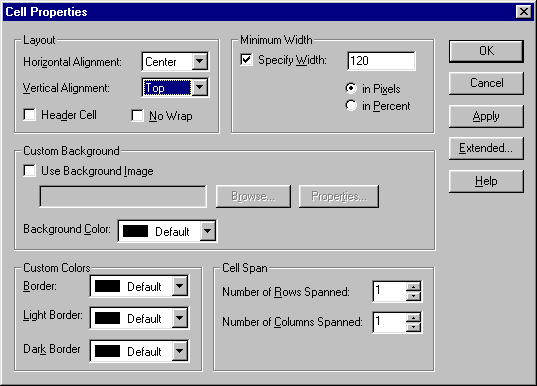
Use the settings above for the upper left table cell. You'll click OK each time and repeat the procedure in the next cell. At the same time, change all the settings for Vertical Alignment to Top. Now, repeat that procedure for the next cell, but in this cell, when you select the Specify Width, change it to 4. Then in the third cell, set the width to 460. This way, your total page width will be under 600 which will show up properly in virtually all screen resolutions, including WebTV. Now repeat that in the second row of your table. Cell widths should be 120, 4 and 460.
Copyright 1998 McWebber.Com All Rights Reserved.