
This is what your page should look like now. Just a blank page with this background. If you decided to use a different background file, that's fine. Now, let's decide on a format for the page before we begin adding text and links. It's much easier to have your layout in mind before beginning. In this case, let's make a table with links on the left side in a column, and the main body of the page on the right.
To do this, we're going to use a table to control the layout. In the menu, click on Table and scroll down to Insert Table. That brings up this dialog:
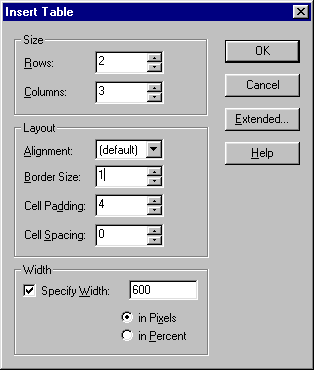
You'll notice the settings chosen. Let's go with those for the time being. We'll change them later, but it's easier to control the page layout with the borders showing right now.
Click OK on those settings.
Copyright 1998 McWebber.Com All Rights Reserved.